


Shopify POS Go has been discontinued. Shopify no longer sells it, the product page has gone from the hardware store, and there is no trade in program.
If you already own one it still works. Mobile selling on POS Go ends on May 26, 2027, and on that date the device switches itself into countertop payment terminal mode and stays there.
If you came here to buy a POS Go, stop looking. The handheld Shopify now points merchants toward is the Verifone Victa Mobile at $399, and if you only need contactless, Tap to Pay costs nothing.
I reviewed this device when it was new and I still think it was good hardware. My hands on testing is further down the page, because it helps to know what you are losing.
This page is no longer a buying recommendation. It is now a guide to a mobile POS device with a published end date.
My Quick Verdict
If you don’t have time to read my entire Shopify POS Go review, here is the short version.
- POS Go is discontinued. Shopify has published no reason anywhere I could find, so I am not going to invent one.
- January 1, 2027: maintenance mode. The device keeps working but stops receiving software updates. May 26, 2027: mobile selling ends and POS Go switches automatically to countertop payment terminal mode.
- Countertop mode keeps tap, chip and swipe, digital wallets and the customer display. The built in barcode scanner is the casualty, because it only runs in mobile mode.
- There is no trade in program, so expect no credit toward anything new.
- Treat your unit as out of warranty. Shopify’s hardware warranty runs 1 year, or 2 years for POS Pro subscribers, and the last units sold in 2024.
- Handheld replacement: Verifone Victa Mobile, $399. Countertop replacement: Shopify POS Terminal, $349, which is the POS Go hardware rebranded. Neither one is the other.
- Tap to Pay costs $0 in hardware, works on every Shopify plan and does not need POS Pro.
What Happened to Shopify POS Go
Shopify has put a banner on its POS Go help page reading “Shopify POS Go is no longer available for sale.” That is the whole public explanation.
No reason has been published. No supply story, no strategy statement, nothing. I am flagging that absence rather than filling it.
The published timeline runs like this:
- Sales have ended. POS Go is off the hardware store and cannot be ordered new.
- January 1, 2027. Maintenance mode begins. Shopify’s phrasing: the device continues to work normally, but no longer receives regular software updates.
- May 26, 2027. Mobile selling functionality ends and the device switches into countertop payment terminal mode.
- After that, your POS Go works as a customer facing card reader paired to a tablet, and nothing else.
There is no trade in program. Shopify states plainly that none exists, and that the intended path is repurposing the device as a countertop terminal.
The Purchase Date Question Shopify Has Not Answered
Shopify’s discontinued card readers page makes one specific promise. POS Go devices purchased before August 28, 2024 in the United States, and before September 25, 2024 in Canada, Australia, New Zealand, the UK, Ireland, Germany, the Netherlands, Belgium, Denmark, Finland, Italy and Spain, stay supported in mobile selling mode until May 26, 2027.
Shopify never says what happens to a unit bought after those dates. There is no second sentence: no earlier cutoff for late buyers, and no different terms either.
That silence reads two ways. The first: the dates mark when Shopify stopped selling POS Go as new hardware in each market, and every unit runs in mobile mode until May 26, 2027. The second: the guarantee is conditional, attaches only to pre cutoff purchases, and a later purchase sits outside it with no promise at all.
Shopify’s own migration guide leans toward the first. It states, with no purchase date qualifier at all, that POS Go continues to work as normal until mobile selling ends on May 26, 2027.
I am not going to resolve this, because Shopify has not. Two of its own pages point in different directions and neither addresses the gap.
So, practically: find out when your device was bought. If that date falls on or after your market’s cutoff, treat the May 26, 2027 guarantee as unconfirmed and confirm it with Shopify support before you plan around it.
One footnote on old news: the last real feature work was Shopify Editions 2024, which brought POS Go to the UK and Ireland. The only update that matters now is the discontinuation.
What Your POS Go Can Still Do After May 2027
A discontinued device is not a dead one. It has a real second life as a counter fixed POS terminal.
What survives the switch: tap and full contactless payment acceptance, chip and swipe (Shopify’s setup page says verbatim that it accepts all three), digital wallets, the customer display and USB-C charging in the dock.
What you lose is not trivial. Shopify is blunt: the scanner is only available in mobile mode, not in countertop mode. If scanning is how your staff ring up sales, that sentence decides your budget.
You also lose handheld selling. The device becomes counter fixed, and countertop mode is a two device setup rather than a standalone one.
The Dock Nuance Worth Getting Right
Right now the dock is required. Shopify’s setup page lists the Shopify POS Terminal Dock, formerly the POS Go Dock, as a required hardware item. It sells separately for $89.
The migration guide adds a carve out that is easy to miss. After May 26, 2027, Shopify says the device can be used in countertop mode without the dock.
So it is a timing decision, not a necessity. Buy the $89 dock only if you want countertop mode before the deadline.
Either way, the device pairs with an iPad or Android tablet running Shopify POS 8.16 or higher, over the same WPA2 Wi-Fi network, using a QR code scan.
Warranty: Assume You Have None
Shopify publishes no POS Go specific warranty page. The device falls under the general hardware policy: 1 year of coverage, or 2 years for POS Pro subscribers, manufacturing defects only.
Now do the arithmetic. The last units sold around August and September 2024, so a 1 year warranty lapsed in late 2025 and even the 2 year window has closed or is closing now.
I would rather say it plainly. Assume no manufacturer warranty is left, whatever the purchase date. If the screen cracks, that is your cost.
And since “maintenance mode” invites optimism: the definition is narrow. The device keeps working and updates stop, with no stated carve out for security patches.
What to Use Instead
This is what most owners came for. The answer turns on two questions: do you need to sell away from the counter, and do you need chip and swipe or only contactless?
| Option | Price | What it covers | The catch |
|---|---|---|---|
| Verifone Victa Mobile | $399, or $449 with dock | Handheld selling, tap, chip, swipe, wallets, scanner | Costs more than POS Go did, and is not sold in every POS Go market |
| Shopify POS Terminal | $349 | A fixed countertop station with a customer display | Counter fixed by design, and no barcode scanning |
| Shopify POS Terminal Dock | $89 | Converting the POS Go you already own | Required today, optional after May 26, 2027 |
| Shopify Tap & Chip Card Reader | $49, or $89 with dock | Tap and chip paired to your own phone or tablet | US only, no scanner, swipe not a headline feature |
| Tap to Pay on iPhone or Android | $0 | Contactless cards and wallets, no hardware | Contactless only, so no chip insert and no swipe |
| Square Terminal | $299 | All in one, with a built in receipt printer | Runs Square, not Shopify POS |
| SumUp Solo | $79 on promotion, $99 list | A simple standalone handheld reader | Runs SumUp’s platform, and the price is a live promotion |
| PayPal Card Reader | $29 first, $79 each extra | Bluetooth reader paired to your own phone | Runs PayPal’s POS app, not Shopify POS |
Verifone Victa Mobile: The Actual Handheld Successor
The $399 Victa Mobile is the device Shopify’s migration guide names for replacing handheld selling. It runs Shopify POS, takes tap, chip, swipe and wallets, has the built in scanner POS Go owners will otherwise lose, and docks with a tablet.
The sting is the price. Replacing a $399 device with a $399 device is a hard sell, the dock adds $99, and there is no trade in credit.
Shopify POS Terminal: The Same Hardware Renamed
Here is the confusion I want to head off. The Shopify POS Terminal at $349 is not the mobile replacement for POS Go. It is the POS Go hardware rebranded for the counter: the Terminal Reader is the former POS Go, the Terminal Dock is the former POS Go Dock, and the $349 product is those two parts boxed together.
Shopify draws the line itself, treating handheld POS Go devices separately from countertop Terminal devices. Buying a Terminal means buying your own device again, and the $89 dock does the same job. My Shopify POS hardware guide covers the catalog.
Tap to Pay: The Replacement That Costs Nothing
If you are staring at a $399 handheld that stops selling in 2027 and refusing to spend another $399, Tap to Pay deserves more than a footnote.
It turns a phone you already own into a card reader. Contactless cards and digital wallets go straight through the Shopify POS app, with no hardware purchase of any kind.
The plan situation is better than most merchants expect. It is available on every Shopify plan with Shopify Payments active as the payment processor, and POS Pro is not required. Shopify’s Android page says so explicitly, and the iPhone page describes the same availability.
On iPhone you need an iPhone XS or newer on a supported iOS release, passcode protected and not on a beta. It does not work on iPad. On Android you need Android 13 or higher with a security patch from the last 12 months and NFC on.
Coverage is wide: 16 markets on iPhone and 18 on Android.
The real limitation is payment type, not amount. Tap to Pay is contactless only, so no chip insert and no swipe. I found no published per transaction or daily limit on either help page.
My honest read: if last month’s takings arrived almost entirely contactless, Tap to Pay replaces your POS Go for $0. If chip and swipe are a real share of sales, the cheapest Shopify path is the Tap & Chip reader at $49 in the US.
If You Are Willing to Leave Shopify POS
Three outside options come up often, with one caveat. None of these run Shopify POS, so moving to any is a platform switch, not a hardware swap.
Square Terminal, $299: all in one, built in receipt printer, contactless, chip and swipe, plus temporary offline operation. My Square Terminal review has the detail.
SumUp Solo, $79 on a current promotion against a $99 list price. A compact standalone reader with its own screen. Budget against the list price, since the discount is live. The SumUp POS review goes deeper.
PayPal Card Reader, $29 for the first and $79 for each additional. Pairs over Bluetooth with your own phone, taking chip, contactless and wallets. See the PayPal Zettle POS review.
If you would rather rebuild than patch, start with the best mobile POS roundup or the wider best POS systems guide.
What is Shopify POS Go?
For anyone who inherited a device and does not know what it is: POS Go is Shopify’s hand-held POS unit, no larger than a smartphone, with the software and hardware to scan products into a cart, take card and wallet payments, fulfill orders and track inventory.

The appeal was avoiding the expense of separate Bluetooth card terminals and barcode scanners. Everything ran from one device, which is exactly what countertop mode takes apart.
POS Go runs on Shopify Payments, which reports 99.9% payment uptime and gives store managers visibility over transactions, daily net sales and cash flow.
A Closer Look At How Shopify POS Go Works
Everything here still applies, and most of it survives the switch to countertop mode. The scanning does not.
When your customer is ready to purchase you scan the item and accept payment. All the shopper has to do is tap, swipe, or insert their card, or use a mobile wallet. You then send a receipt by text or email.
If an item is out of stock and your customer still wants it, you can close the sale, take payment, and have the order shipped from another location that has stock.
Allbirds used POS Go for buy in store and ship to customer fulfillment across its 20 stores.
Similarly, if a shopper is not ready to buy and the product is listed online, you can email the order details across. If your salespeople work on commission, your store still knows who sent it and credits them for the sale.
Other things I rated during testing: you can look up product availability across all locations in a couple of taps, pull up a customer’s purchase history, and reach product detail without walking back to a cash register. Battery life held up across a full day.
Lastly, all Shopify card readers are PCI compliant and meet EMV standards for chip cards, and that does not lapse because the product did.
Who Is Shopify POS Go Best For?
The useful version of this question is no longer who should buy one. It is who can sit tight, and who needs to move now.
You can comfortably keep using yours if the device mostly lives on the counter, if barcode scanning is not central to how you ring up sales, and if a pop-up shop is occasional rather than your main channel. In that case the $89 dock, or waiting for the switch on May 26, 2027, keeps your spend near zero.
You should be planning a replacement now if you sell from the shop floor, run market stalls or food trucks, or scan barcodes as the main way products reach the cart.
Brick-and-mortar stores that bought POS Go to take payments anywhere on the floor sit squarely in that second group. The clock is the problem, not the device. My Shopify POS review covers the software side.
Shopify POS Go’s Pros and Cons
Pros 👍
- It genuinely delivered one device in-person checkout, with no extra card terminal or scanner to buy.
- The hardware is hand-held and light enough to carry all day.
- Shopify Payments reports 99.9% payment uptime behind it.
- It syncs directly with your Shopify store, keeping inventory and fulfillment options in one place.
- It still has a second life as a countertop terminal after May 26, 2027, so it does not become e-waste.
- 24/7 phone, live chat and email support remains available for Shopify POS.
Cons 👎
- It is discontinued. Mobile selling ends on May 26, 2027 and there is no way to extend that.
- No more software updates after January 1, 2027, with no stated security-patch exception.
- The built-in barcode scanner stops working entirely once the device drops to countertop mode.
- No trade-in program and no migration discount, so replacing it is full price.
- Every unit in circulation is out of warranty or about to be.
- As a cloud-based device it still depends on a stable Wi-Fi connection to process transactions.
- It never supported split or partial payments.
Pricing
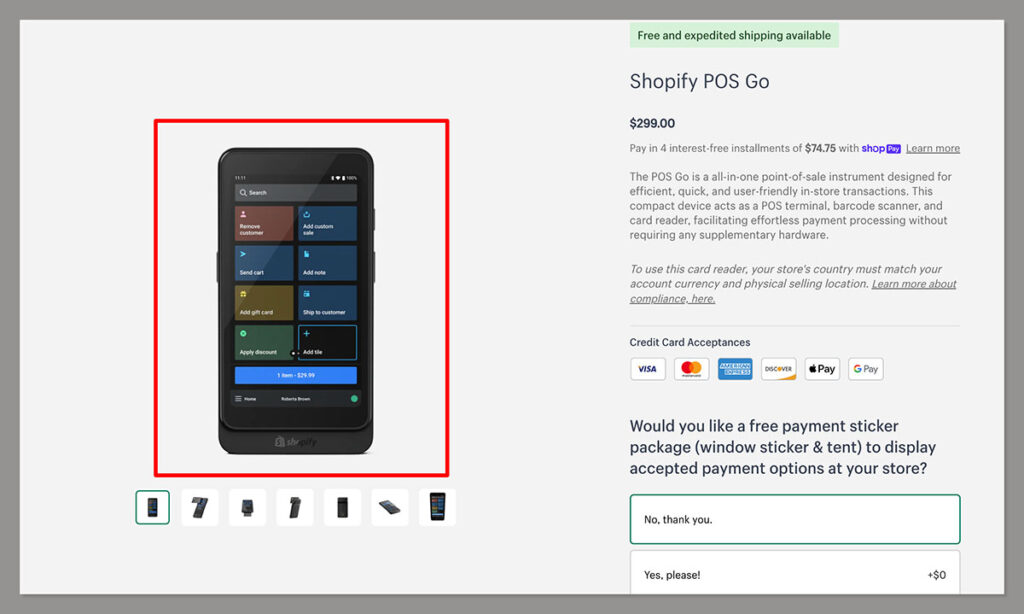
POS Go sold for $399 in the US before it was withdrawn, with a case at $29 and four interest free installments of $74.75. Those figures are history, left here only so you can compare against replacement costs.
The number that matters today is what it costs to keep selling after 2027: from $0 with Tap to Pay, to $89 for a dock, to $399 for a Victa Mobile.
Processing rates have moved since I first wrote this review, and the 10¢ in-person transaction fee did not exist in 2024. Current US in-person rates: Basic 2.6% + 10¢, Grow 2.5% + 10¢ (the plan formerly called simply Shopify), and Advanced 2.4% + 10¢.
Those are US figures. Card rate structures differ materially by country, so check your own market.
Shopify POS Pro still costs $89 per month per location, and it is the subscription that would have given you the longer 2 year hardware warranty. It is not required for Tap to Pay.
Ease of Use
POS Go was explicitly designed for ease of use. Like any software there is a learning curve, mainly if you have not used a POS system before.
The interface is easy to navigate, which makes finding products, managing inventory and taking payments straightforward for staff who are not technical. It is optimized for portability, and its Shopify integration keeps inventory, orders and sales data in one place.
Shopify still offers a deep library of tutorials plus phone, live chat and email support, though I expect POS Go documentation to thin out after maintenance mode begins.
Further reading 📚
Step-by-Step Guide on How to Use Shopify POS Go
This walkthrough is for owners rather than buyers, and it works as written until May 26, 2027. My guide to using Shopify POS covers the app side.
Initial Setup and Requirements
To use POS Go you need Shopify Payments enabled, your business operating in Canada, the US, Ireland or the UK, retail locations in the same country as your store, and a WPA2 Wi-Fi network.
- Press and release the power button on the right side until the Shopify logo appears.
- Select your language, then the country where you are selling in person.
- Select your Wi-Fi network and enter the password. The device checks for updates and applies them automatically. After January 1, 2027 this step stops finding anything.
- Log into your store and follow the prompts. A six-digit code may be sent to your phone to enter on the device.
- Tap each store name you want the device to log into, then select the location where you are selling.
- The device walks you through a short visual tour. Tap “Skip” to move past it.
- You land on the main navigation homepage, with Orders, Products and Customers along the bottom.
Processing a Sale with POS Go
- From the bottom bar of the homepage, tap the “products” icon.
- Choose the product and variants your customer wants, then tap the blue “add to cart” button.
- Tap “go to cart,” then “checkout,” then select “credit/debit card.”
- Your customer can tap the device, swipe, or insert their card into the slot at the bottom.
- The screen confirms approval, then asks how to send the receipt: print, email or text message.
All three payment methods carry over to countertop mode, which is reassuring for a shop that mostly sells from behind a counter.
Using the Integrated Barcode Scanner
Read this section knowing that everything in it stops working on May 26, 2027. The scanner is mobile mode only.
- To activate the scanner, press and hold either the right or left side button.
- Point the unit at the barcode. A red light confirms the scan.
- The app shows the product title, size and thumbnail, and adds the item to the cart. Plus and minus buttons adjust quantity.
- Tap the blue “go to cart” button at the bottom of the screen.
- To check a price without selling, scan the item, read the price, then tap “clear cart.”
Scanning an order receipt pulls up the order details on screen. You can also scan a physical gift card to see its balance, then choose “Gift Card” at checkout and scan it again to redeem.
Plan around this one. If gift card scanning is part of your workflow, a tablet camera or a separate scanner has to cover it from 2027.
Logging Out
You can log out remotely from any POS Go device. From your Shopify Admin, open the “Devices” tab under the Point of Sale channel, select the device, and click “Log out from store.”
What POS Go Owners Should Do Now
Seven steps, in the order I would actually do them.
- Check your purchase date against your market cutoff: before August 28, 2024 in the US, before September 25, 2024 elsewhere. On or after it, treat the May 26, 2027 guarantee as unconfirmed and ask Shopify support.
- Assume no warranty remains, whatever the purchase date.
- Decide whether you actually need mobile selling. Count a week of transactions that happen away from the counter.
- Choose a replacement before May 26, 2027. The $399 Victa Mobile for chip, swipe and scanning, or $0 Tap to Pay if contactless is enough.
- If you only need a fixed station, keep the POS Go. Buy the $89 dock now, or wait, since it becomes optional afterward.
- Expect no software updates after January 1, 2027. Budget for friction with newer versions of the Shopify POS app.
- Do not wait for a trade in offer. If you retire the device, take it to a local e-waste center.
Shopify Point of Sale (POS) Go: My Final Verdict
I liked this device. A hand-held unit the size of a phone that scanned barcodes, gift cards and receipts, took every payment type and let staff sell anywhere on the floor was a good idea.
So here is my recommendation, and it is not the cautious one. Keep using your POS Go until it stops, but decide on the replacement in the next few months rather than in early 2027.
The reasoning is simple. There is no benefit to replacing working hardware early and no trade in credit for acting sooner, so running it until May 26, 2027 is free.
But the decision is worth making early even if the purchase is not. Deadlines like this land in the middle of a busy trading week.
The exception is a late-bought unit. If yours was bought on or after your market’s cutoff, have the support conversation now.
For most shops the honest landing point is unglamorous: either $0 on Tap to Pay or $89 on a dock, with the $399 Victa Mobile reserved for stores where scanning and mobility drive sales. If you are rethinking the whole setup, the best Shopify POS systems guide is the sensible next read.
Do you own a POS Go, and have you decided what happens to it? Tell me in the comments below.


Comments 0 Responses