


Clover vs Square vs Shopify: Which vendor should you choose to access the best point of sale system for your growing business?
All three of these companies have an excellent reputation in the POS market. With Clover, Square, and Shopify, you can manage and process sales in an omnichannel landscape, combining online transactions with in-person purchases.
They all offer robust payment processing functionality, access to add-on tools like card reader systems and cash registers, and powerful product and inventory management tools.
Plus, all three platforms benefit from exceptional ease of use and flexibility.
So, how do you pick the right service for your needs?
Today, we’re looking at the hardware, software, and pricing of all three solutions, to help you make the right choice. Pricing and hardware have shifted materially across all three platforms in the last two years.
Quick Verdict
We’ve chosen Square as our number one POS vendor based on this three-way comparison. Square stands out for its exceptional range of hardware options, easy-to-use software, and affordable pricing, though the genuinely free entry tier is what earns that crown now that Square sells paid plans at $49 and $149 per month per location.
However, it’s worth noting that Shopify does offer a wider range of software features, and Clover beats the competition in terms of customer service. Clover still advertises 24/7 phone and chat support, while Square now reserves 24/7 phone access for its $149 per month Premium plan.
Clover vs Square vs Shopify: At a Glance
Before we unpack each platform in detail, the table below settles the core numbers that drive most buying decisions.
| Platform | Software cost | In-person rate | Online rate | Cheapest reader | Contract |
|---|---|---|---|---|---|
| Square | Free, or $49 and $149 per month per location | 2.6% + 15c (Free), 2.5% + 15c (Plus), 2.4% + 15c (Premium) | 3.3% + 30c (Free), 2.9% + 30c (paid) | First magstripe reader free | Month to month |
| Shopify POS | Lite included with any Shopify plan from $39 per month; POS Pro $89 per month per location billed yearly | 2.6% + 10c (Basic), 2.5% + 10c (Grow), 2.4% + 10c (Advanced) | 2.9%, 2.7%, 2.5% + 30c | Tap and Chip reader $49 | Month to month or annual |
| Clover | Direct online plans from about $16 per month (Starter) to $180 (Retail Growth) and $240 (Retail Advanced) | Direct rate 2.6% + 10c down to 2.3% + 10c | Varies by plan and channel | Clover Go $199 | Varies by reseller, often 36 to 48 months |
The table settles the software-cost question for Square and Shopify, but Clover’s row is the one that moves: a bank or reseller sets its own rate and term, so the number you pay depends on who sells you the account. We cover that in full below.
Square vs Shopify vs Clover: An Introduction
Suitable for small businesses and scaling companies alike, Square, Shopify, and Clover POS are all comprehensive point of sale solutions, with powerful customizable features.
They all integrate with the top ecommerce platforms, for multi-channel selling, and provide access to an intuitive backend environment. However, there are some slight differences between the systems.
What is Square POS?

Square POS is an industry-leading point of sale solution, with specific features for both retail businesses and restaurants.
The point of sale system combines product and inventory management with excellent tools for tracking employee performance and customer profiles.
What is Clover POS?
Similar to Square, Clover is a cloud-based point of sale solution, with dedicated tools for restaurant and food service companies.
It’s a little different to most POS systems, however, as it does require companies to acquire a merchant account, through the Fiserv parent company. Clover is sold through Fiserv-affiliated banks, ISOs and independent resellers rather than uniformly by Fiserv itself, and who sells you the account decides your processing rate and your contract. We explain how that works in the reseller section below.
What is Shopify POS?

Finally, Shopify POS is a dedicated point of sale solution for Shopify ecommerce store owners. It integrates seamlessly with your Shopify store, supporting omnichannel sales, marketing, and analytics, with a comprehensive backend dashboard.
Let’s take a closer look at what each of these solutions can do.
Clover vs Square vs Shopify: Software Features
Quick Verdict: Ultimately, Shopify offers the most versatile selection of POS software features. It covers everything from marketing, to employee and customer management, inventory and order processing, and customizable checkout creation.
Plus, Shopify’s extensive app market makes it easy to find add-ons and integrations to expand your solution’s functionality.
Today’s comprehensive point of sale solutions combine intuitive software with customizable hardware kits to support a wide range of businesses.
All three of the platforms compared here offer access to cloud-based tools. What’s more, they can all process payments in offline mode, which is ideal if you suddenly lose access to the internet in your store.
Here’s what you can expect in terms of software from Clover, Square, and Shopify.
Square POS Software Features
Square POS offers a huge selection of software features to business owners. The exact functionality you’ll access will depend on whether you choose Square POS for Retail, or Square POS for Restaurants.
Notably, the food-service focused POS solution includes more advanced functionality for restaurants and cafes, such as menu management and tableside ordering.
All versions of Square POS include inventory, product, and employee management tools. Plus, they all allow for omnichannel selling, with integrations to ecommerce platforms and social media channels.
Additionally, Square POS supports comprehensive payment processing tools, advanced staff management solutions, and in-depth financial analytics and reports.
Key features include:
- Payment processing with credit card, debit card, gift card, and mobile wallet options
- PCI compliance, fraud protection, and advanced security features
- Customizable checkouts with categories, item information and modifiers
- Transaction management with split tenders and custom receipts
- Customer profiles with feedback and reviews, notes, and customer tags
- Ecommerce integrations and integrations to social media channels
- Customer engagement tools like email marketing and loyalty programs
- Integrations to accounting tools like Xero, as well as ecommerce platforms
- Open API for automating comprehensive workflows
- Employee management with scheduling, performance insights and role permissions
- Delivery, pickup, and fulfillment features
Shopify POS Software Features
Similar to Square, Shopify is an all-in-one point of sale system, which allows companies to manage inventory, orders, and payments through a convenient backend.
There are mobile apps available for iOS and Android, plus, Shopify offers its own integrated payment processing solution in the form of Shopify Payments.
This allows users to accept credit card payments and debit card payments, as well as mobile wallet transactions (Apple Pay and Google Pay).
Shopify POS integrates seamlessly with the Shopify ecommerce ecosystem, making it easy to sync inventory information and financial data between channels.
Plus, the Shopify app marketplace makes it easy to link your system to a range of other tools. Key features include:
- Omnichannel selling for in-store, online, marketplace, and social media sales
- Local delivery and pickup options
- Comprehensive inventory management with demand forecasting
- Instant purchase orders and stock reports
- Custom checkouts with discounts, order notes, and a camera barcode scanner
- Product management for unlimited products with collections and variants
- Customer profiles with contact details, order history and marketing preferences
- Analytics and reports on discounts, inventory, sales and employee performance
- Payment processing with Shopify payments
- Various payment method options including gift cards and split tenders
- Marketing via Google Merchant center, email, and social media
- Customer reviews, loyalty programs, and rewards
- Staff management with customizable roles and permissions
- Integrations with a huge collection of online apps and tools
MORE: Shopify Payments Review: The Complete Guide
Clover POS Software Features
Clover’s easy-to-use point of sale platform comes with a comprehensive dashboard where you can manage online and offline sales, track metrics, and take payments anywhere.
Clover can integrate with a wide range of tools, including ecommerce platforms and accounting software.
Plus, Clover benefits from dedicated solutions for restaurants and food service businesses, such as menu management, tableside ordering, and kitchen displays.
Clover software is available to use through mobile apps, or dedicated hardware solutions like Clover Flex.
Plus, there are built-in security and privacy tools for business leaders. Clover even gives companies comprehensive access to merchant services, for payment and transaction management.
Key features of Clover POS include:
- Online ordering and integrations with third-party delivery companies
- Ecommerce integrations for online selling
- Customizable branded invoicing and receipts
- Built-in payment protection and fraud management
- Cashflow analytics, tracking, reporting, and business insights
- Comprehensive inventory and order management
- Customer engagement tools such as profiles and loyalty programs
- Multiple payment options such as mobile wallets and credit cards
- Employee management with shift planning and scheduling
- Integrations with a range of tools through the Clover app market
- Dedicated tools for restaurants and food service businesses
Square POS vs Shopify POS vs Clover: Hardware Solutions
Quick Verdict: Square is the winner of this round, with a wide range of hardware solutions to choose from, starting with a magstripe reader that is free for your first unit. Square hardware is easy to use, and there are plenty of tools to choose from for retailers and restaurants alike.
You can even access a huge range of accessories like receipt printers and barcode scanners.
While cloud-based point of sale solutions allow retailers to access the software they need for payment processing using a smartphone or tablet, most omnichannel sellers will need at least some POS hardware.
Some store owners rely on simple solutions like card readers, for quick credit card processing, for either chip cards or contactless payment methods.
Other organizations use a variety of hardware solutions and accessories, such as a receipt printer, cash drawer, barcode scanner, and more. Fortunately, Clover, Square, and Shopify all offer vendors a range of options to choose from.
Clover’s devices range from convenient handheld card readers, like the Clover Go for $199, which pairs instantly with mobile devices, to the Clover Station Solo, with a cash drawer, touchscreen, and receipt printer.
Companies can also opt for tools like the Clover Mini, and the Clover Flex, a mobile point of sale solution, which works a lot like a smartphone.
Square also produces hardware to suit a variety of business needs. There are simple card readers, as well as all-in-one kits like the Square Terminal, which comes with a credit card reader, receipt printer, and payment processing tools.
There’s also the Square Register, and dedicated bundles like the Square Retail Kit. Square even offers dedicated solutions for restaurants, with self-service screens and kiosks. The first magstripe reader from Square is free, and the contactless and chip reader is $59.
Compared to Square and Clover, Shopify’s hardware options are a little more limited, however, there are still options suited to a variety of business models.
Companies can purchase tools like the Tap and Chip Card Reader for $49, sold as the WisePad 3 outside the US, which takes tap and chip payments in seconds. Shopify also sells a POS Terminal at $349 for a fixed counter, and a tablet paired with the Tap and Chip reader is now the recommended mobile route.
There are also retail bundles available, and business leaders can create their own custom bundles from scratch.
Here is how the current hardware lineups compare side by side.

| Device | Square | Shopify | Clover |
|---|---|---|---|
| Entry card reader | Magstripe reader: first free, additional $10 each | Tap and Chip Card Reader: $49 | Clover Go: $199 |
| Contactless/chip reader | Contactless and chip reader: $59 | ||
| Tablet stand | Stand: $149 | ||
| Self-service kiosk | Kiosk: $149 | Clover Kiosk: $3,599 plus $34.95/month per device | |
| Smart terminal | Terminal: $299 | POS Terminal: $349 | Clover Flex: $599 to $749 |
| Handheld POS | Handheld: $399 | ||
| Full register | Register: $899 (or $44/month over 24 months) | Station Solo: from about $174/month bundled; Station Duo: from about $180/month bundled | |
| Compact device | Clover Compact: quote required | ||
| Mini countertop | Clover Mini: $849 upfront or about $45/month |
Square vs Shopify vs Clover: Customer Support
Quick Verdict: Clover is the winner of this round, with excellent customer service available through phone, email, and chat. Clover can also offer access to dedicated onboarding and integration services, and has an excellent reputation based on consumer reviews.
The good news for companies investing in Clover, Shopify, or Square for their payment processing needs, is all three companies promise exceptional ease of use.
Whether you’re using a POS app to process payments through your smartphone or tablet, or you’re connecting your POS software with dedicated magstripe readers and retail POS kits, you shouldn’t have any trouble getting setup.
All three companies provide business leaders with step-by-step guidance, documentation, and resources.
The POS features are straightforward and convenient, and all three vendors provide access to powerful analytics and reports, so you can consistently improve customer loyalty, track online payments and offline payments, and stay on top of inventory levels.
If you do need support with your solution, Shopify offers customer support through live chat or email, or you can seek out solutions through the Shopify website, where you’ll find FAQs and blogs.
It’s also possible to hire a Shopify Expert to work with you on setup and product implementation.
Clover has its own help center, as well as personalized support available through email, chat, and phone call. However, it’s worth noting that the phone service is currently only accessible for US merchants.
Square also offers phone, email, and chat support, as well as a fantastic resource center, with plenty of information on everything from customer management to software customization. That phone access is tiered by plan, however: Free-plan merchants get phone support for only 90 days, Plus is business hours only, and 24/7 phone support is a Premium benefit at $149 per month per location.
Notably, all three vendors have also earned fantastic user reviews for their ease of use and approach to customer management.
Clover now holds a 2.3 out of 5 rating on Trustpilot from 2,184 reviews, while Square US sits at roughly 4.0 out of 5 from 7,456 reviews, and Shopify POS holds 4.4 out of 5 on G2.com from roughly 335 reviews. On G2 and Capterra, Clover rates around 3.8 to 3.9 out of 5, so the low Trustpilot score reflects billing and account complaints concentrated in the reseller channel rather than the support responsiveness itself. Support breadth and overall reputation are two different numbers now, and Clover still wins the first.
Clover vs Square vs Shopify: Pricing Plans
Quick Verdict: Square is still the cheapest way to start because its software tier is genuinely free, but that is not the whole story. Square now sells paid software tiers at $49 and $149 per month per location, and 24/7 phone support sits behind the Premium plan, so the free tier carries real trade-offs.
Square Pricing
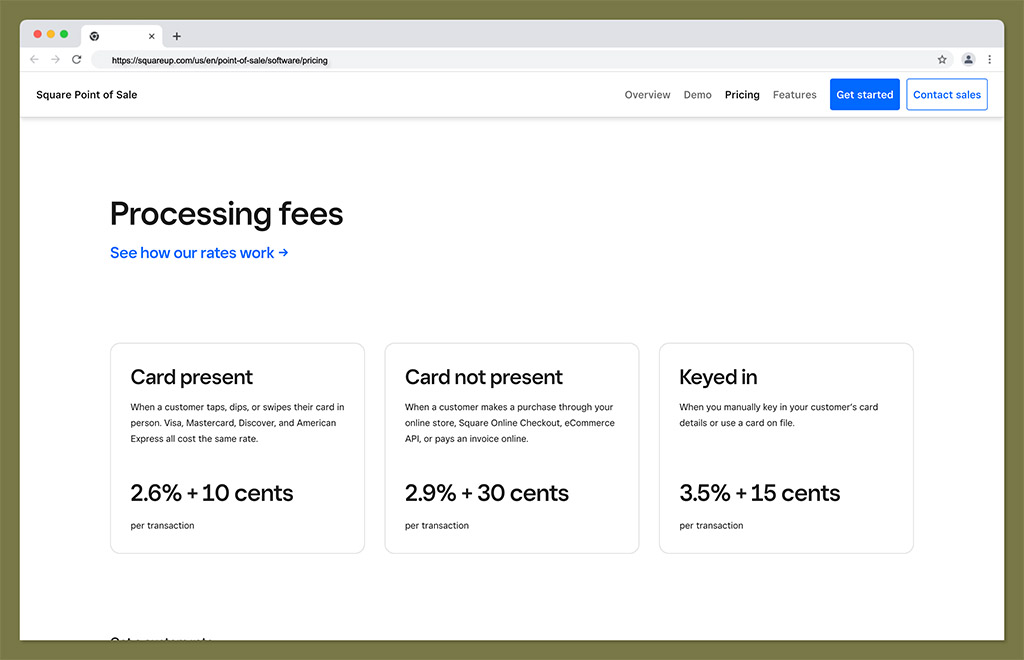
Square’s software comes in three tiers, all month to month with no long-term contract and a 30-day free trial on the paid plans.
Free: $0 per month per location. Card-present transactions cost 2.6% + 15 cents, online transactions cost 3.3% + 30 cents, and manually keyed transactions cost 3.5% + 15 cents. ACH payments cost 1% with a $1 minimum.
Plus: $49 per month per location. Card-present rate drops to 2.5% + 15 cents, and online drops to 2.9% + 30 cents.
Premium: $149 per month per location. Card-present rate drops again to 2.4% + 15 cents, with the same 2.9% + 30 cents online rate as Plus, and you unlock 24/7 phone support.
The jump from Free to Plus buys you a lower processing rate and better support, so it pays for itself once your monthly card volume is high enough.
Clover Pricing
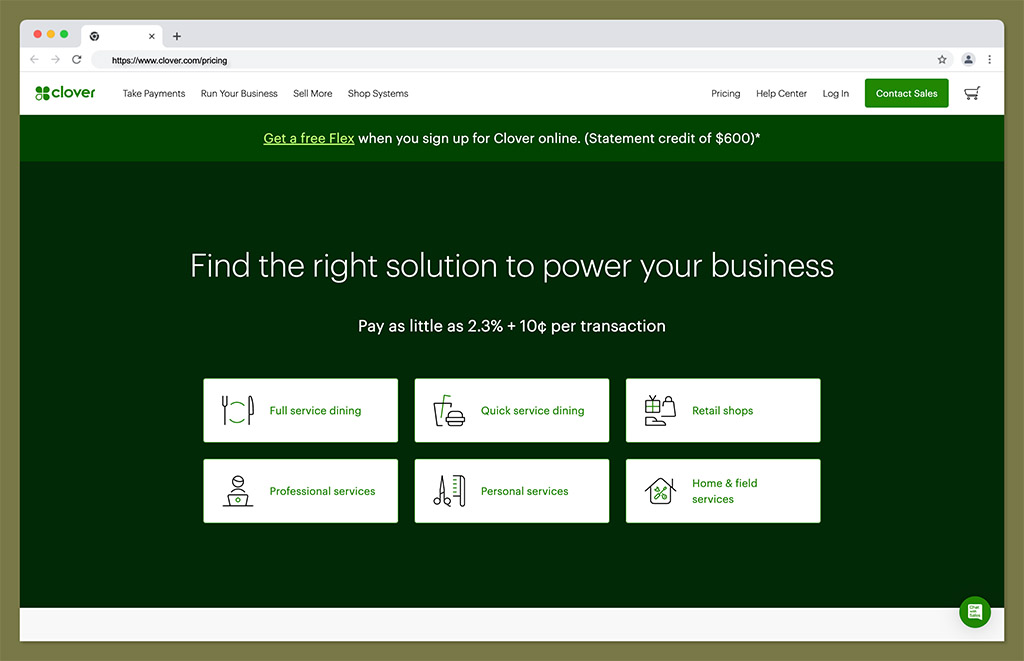
Clover publishes direct online pricing for self-signup buyers. On the retail side, direct plans start at about $16 per month for Starter (or $349 upfront), climb to roughly $180 per month for Retail Growth, and reach around $240 per month for Retail Advanced. Direct online processing rates run from 2.6% + 10 cents on Starter down to 2.3% + 10 cents on the Growth and Advanced tiers.
That direct pricing is only one channel, however. On the restaurant side, Clover’s full-service plans reach roughly $354 per month for the Full Service Advanced tier, well above what the entry-level retail plans suggest.
The crucial qualifier is that those numbers apply when you buy directly from Clover’s website. A Clover account bought through a bank or independent reseller can carry a completely different processing rate and contract term, which we cover in the next section.
Shopify Pricing

Shopify POS Lite is included with every Shopify ecommerce plan at no extra charge. POS Pro, which adds retail-specific features like staff permissions and advanced inventory, costs $89 per month per location billed yearly on top of your core plan.
The underlying Shopify plans are Starter at $5 per month, Basic at $39 per month, Grow at $105 per month (renamed from the old “Shopify” plan), Advanced at $399 per month, and Plus starting at $2,300 per month on a three-year term.
In-person rates step down with your plan: 2.6% + 10 cents on Basic, 2.5% + 10 cents on Grow, and 2.4% + 10 cents on Advanced. Online rates are 2.9%, 2.7%, and 2.5% + 30 cents respectively. If you use a third-party payment gateway instead of Shopify Payments, an extra fee applies, which falls from 2% on Basic to 1% on Grow and 0.6% on Advanced.
Here is how the three platforms compare on the numbers that matter most at sign-up.
| Square | Shopify POS | Clover | |
|---|---|---|---|
| Software cost | Free, $49/month or $149/month per location | Lite included; Pro $89/month per location billed yearly | Direct online from about $16 to $240/month retail; restaurant up to roughly $354/month |
| In-person rate | 2.6% + 15c (Free), 2.5% + 15c (Plus), 2.4% + 15c (Premium) | 2.6% + 10c (Basic), 2.5% + 10c (Grow), 2.4% + 10c (Advanced) | Direct 2.6% + 10c to 2.3% + 10c; reseller rates vary |
| Online rate | 3.3% + 30c (Free), 2.9% + 30c (paid) | 2.9%, 2.7%, 2.5% + 30c | Varies |
| Entry tier includes | Full POS software, basic reporting, limited phone support | POS Lite with checkout and inventory sync | Starter retail plan with core POS features |
Pricing pages change. Confirm the current figures before you buy, and with Clover, always get your rate and term in writing.
How Clover’s Reseller Model Changes What You Pay
Clover is a Fiserv product, but most Clover accounts are not sold by Fiserv directly. They are sold by banks, ISOs and independent resellers, and each one sets its own processing rate and contract terms. Two merchants can buy identical Clover hardware and pay materially different rates.
At the good end, a high-volume merchant negotiating interchange-plus pricing can pay interchange plus roughly 0.10% plus 5 cents. At the bad end, a merchant who accepts the first quote put in front of them can pay a flat rate well above 3%.
Early termination fees in the $295 to $595 range are common on reseller-sold agreements, and contract lengths of 36 to 48 months are typical. Equipment can also be leased on a separate, non-cancellable lease that survives cancelling the processing account, so you can switch processors and still owe the full remaining lease balance.
Before you sign a Clover agreement through any channel other than the direct online sign-up, get the following in writing:
- The effective processing rate, including every per-transaction fee.
- The contract length.
- The early termination fee and how it is calculated.
- Whether hardware is bought outright or leased.
- Whether the lease is cancellable if you leave the processor.
This channel is where Clover’s billing complaints come from, which is why its Trustpilot score and its support reputation point in different directions. The reseller model gives you a local contact and strong support, but it also gives you a contract you need to read carefully.
Contracts and Lock-In
Square is month to month on every tier, including Plus and Premium. There is no long-term contract and no early termination fee. Hardware is bought outright, and you can leave at any time. The commitment is low. The one caveat is that Square hardware only runs Square processing, so the kit itself does not follow you to another provider.
Shopify plans can be paid monthly or annually, and POS Pro bills per location, so a second store doubles that line. POS Pro is billed yearly in any case, so that line is an annual commitment even when your core plan is not.
Clover depends entirely on who sold you the account. A direct online sign-up is far simpler than a bank or reseller agreement, which is where the 36 to 48 month terms and early termination fees live. Clover hardware bought through one processor cannot be reprogrammed for a different processor, so switching generally means buying new hardware. Read the promotional offers carefully as well. Clover has run free-device deals, such as a Clover Go for a cent a month, that are contingent on a minimum annual processing volume of $100,000 and a three-year merchant processing agreement.
Whichever platform you leave, export your inventory and customer data before you close the account. On Square, items export to CSV from the dashboard and contacts export from the customer directory. Do it while the account is still open, because nobody will do it for you afterwards.
Clover vs Square vs Shopify: The Verdict
Overall, Shopify, Clover, and Square all offer fantastic point of sale solutions, with built-in payment processors, reasonable processing rates, and powerful management software.
All three solutions can integrate with a range of tools, like QuickBooks for accounting, or your ecommerce platform.
Additionally, there are countless hardware options to choose from with each vendor, whether you’re looking for something comprehensive like the Clover Station Duo, or something simple, like the Square Stand for your iPad.
However, each offering has its own pros and cons to consider.
Square offers a fantastic, and easy-to-use solution for retailers, with a genuinely free POS software plan and fantastic customer support, though the free tier now comes with trade-offs on phone access and processing rates that the paid tiers address.
This could make Square the ideal option for a budget-conscious startup, looking to get started without paying a consistent monthly fee.
Shopify is an ideal POS vendor for companies who already have their own ecommerce store on the Shopify platform.
You can access the Lite version of Shopify POS on virtually any plan, along with a host of valuable tools for creating a robust online presence.
Finally, Clover might be the ideal option for companies in specific industries, such as the restaurant or food service landscape, thanks to its unique modules for kitchen and menu management.
Which one fits you depends on where you sell and who you buy from.
Retail: Square, for the free tier and the widest hardware range at the lowest entry cost.
Food service: Clover, for table management, menu tools and 24/7 phone support, provided you get the rate and term in writing.
Businesses already selling online with Shopify: Shopify POS, because Lite is included and inventory is already unified.
Service businesses: Square, for appointments and invoicing with no monthly floor.
Volume matters as much as vertical. Clover’s lower card-present percentage only starts to pay for its higher software fee at scale, and estimates of the crossover point against Square’s free tier range from about $5,000 to $20,000 in monthly card volume depending on your average ticket. At around $40,000 a month on a $30 average ticket, Clover tends to work out roughly $100 a month cheaper overall.
With Clover specifically, the right pick depends on what the contract says. Read it before you sign.



Comments 0 Responses